Saturday, February 16, 2019

face collage feb 25, 27 and mar 1


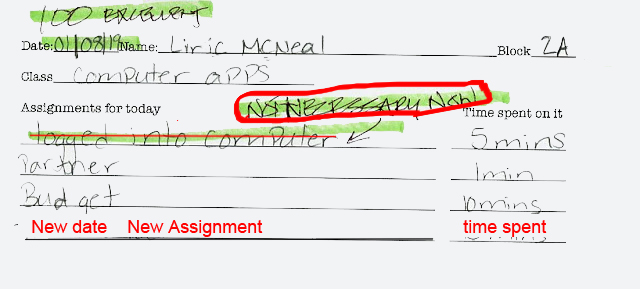
Front of assignment sheet


Use back side for more room and continued use

Be sure to fill in every blank correctly. Even if you do not spend any time on an assignments, write in 0 (zero). This will not count against you. What will count against you is leaving a blank empty.

You may use one sheet more than one class
If a new assignment is given on a new date, write that plus the time you spent on the assignment.
Always include the date you are 
turning in the assignments sheet


Do Today:

1. Face Collage  due Wednesday

Show me what you have downloaded. That's all  you need to do right now.

Let's do a Photoshop demonstration
together before you start your final collage.


Standards:

Safety 1) Demonstrate the ability to comply with personal and environmental safety practices associated with art and design applications: the use of adhesives; hand tools; machines; and the handling, storage, and disposal of chemicals/materials in accordance with local, state, and federal safety and environmental regulations. Complete a safety test with 100 percent accuracy. 

Basic Illustration 15) Create two-dimensional and three-dimensional sketches, including rough and refined sketches, demonstrating shape, volume, depth, and dimension

Design Projects 23) Apply the design process to complete projects of increasing complexity and of varying applications such as print, web, film, and marketing communications. 


Assignment directions:


Objectives:

1. Use specific Photoshop tools correctly.
2. Resize and move shapes to create a design or recognizable images.
3. Show a center of interest and emphasis


Face Collage

Open Photoshop if it does not appear in your dock.

In the Photoshop Options Bar (top of screen) go to Window
Check the following (unless already has checkmark) :
Workspace>Essentials
Layers
Application Frame
Options
Tools


Create a Photoshop document

Name: Face Collage
Width: 8 inches
Height: 10 inches 
Resolution: 200
Color mode: RGB


ideas:


Create a face collage using facial features from different photos.

You must include:

A face shape
Two different eyes
A different nose
A different mouth
Different hair

Use the Polygonal lasso tool, the lasso tool or the magnetic lasso tool to make and cut out selections that you will paste into your document. 

http://stevecampbellhillwood.blogspot.com/2015/12/photoshop-tools-explained.html

Tuesday, February 12, 2019

face collage


Front of assignment sheet


Use back side for more room and continued use

Be sure to fill in every blank correctly. Even if you do not spend any time on an assignments, write in 0 (zero). This will not count against you. What will count against you is leaving a blank empty.

You may use one sheet more than one class
If a new assignment is given on a new date, write that plus the time you spent on the assignment.
Always include the date you are 
turning in the assignments sheet


Do Today:

1. Progress report grades

2. Face Collage


Standards:

Safety 1) Demonstrate the ability to comply with personal and environmental safety practices associated with art and design applications: the use of adhesives; hand tools; machines; and the handling, storage, and disposal of chemicals/materials in accordance with local, state, and federal safety and environmental regulations. Complete a safety test with 100 percent accuracy. 

Basic Illustration 15) Create two-dimensional and three-dimensional sketches, including rough and refined sketches, demonstrating shape, volume, depth, and dimension

Design Projects 23) Apply the design process to complete projects of increasing complexity and of varying applications such as print, web, film, and marketing communications. 


Assignment directions:


Objectives:

1. Use specific Photoshop tools correctly.
2. Resize and move shapes to create a design or recognizable images.
3. Show a center of interest and emphasis


Face Collage

Open Photoshop if it does not appear in your dock.

In the Photoshop Options Bar (top of screen) go to Window
Check the following (unless already has checkmark) :
Workspace>Essentials
Layers
Application Frame
Options
Tools


Create a Photoshop document

Name: Face Collage
Width: 8 inches
Height: 10 inches 
Resolution: 200
Color mode: RGB


ideas:


Create a face collage using facial features from different photos.

You must include:

A face shape
Two different eyes
A different nose
A different mouth
Different hair

Use the Polygonal lasso tool, the lasso tool or the magnetic lasso tool to make and cut out selections that you will paste into your document. 

http://stevecampbellhillwood.blogspot.com/2015/12/photoshop-tools-explained.html

Saturday, February 2, 2019

custom shape artwork_feb 5 and feb 11_15


Front of assignment sheet
Use back side for more room and continued use

Be sure to fill in every blank correctly. Even if you do not spend any time on an assignments, write in 0 (zero). This will not count against you. What will count against you is leaving a blank empty.


February 1 is the last day to make up past due work

What connection do the assignments using only circles, squares and triangles have to do with these icons?
Almost all these icons are made up of circles, rectangles and triangles.


What purpose do icons such as these serve in the real world? 
They communicate meaning and information simply and without words.

All your responses were great! Thank you.

Everyone got a 100.


Do Today:

1. Progress report grades
Do you want to pass and or graduate?
• Seniors first 
• If you are failing, I will contact your parent or guardian


2. In Photoshop, using only black as your color, and using only the custom shape tool, create a design from only circles, rectangles, and triangles
We will start this together

Save as 2 different documents:
•Shapes poster B&W 
•Shapes color
See directions below

4. Extra credit: Watch video and create your own custom shape with the pen tool. 

Go to 11:00. See if you can make your own custom shape.

Standards:

Safety 1) Demonstrate the ability to comply with personal and environmental safety practices associated with art and design applications: the use of adhesives; hand tools; machines; and the handling, storage, and disposal of chemicals/materials in accordance with local, state, and federal safety and environmental regulations. Complete a safety test with 100 percent accuracy. 

Basic Illustration 15) Create two-dimensional and three-dimensional sketches, including rough and refined sketches, demonstrating shape, volume, depth, and dimension

Design Projects 23) Apply the design process to complete projects of increasing complexity and of varying applications such as print, web, film, and marketing communications. 


Assignment directions:


Objectives:

1. Use specific Photoshop tools correctly.
2. Resize and move shapes to create a design or recognizable images.
3. Show a center of interest and emphasis

Title: Circle, rectangle, triangle

Width: 11 inches
Height: 17 inches
Resolution: 300
Color Mode: RGB


Specifications:

•At least 30 shapes_circle, square and rectangle only
•Black and white only
•Shapes should fill all the space an be touching one another, but not overlapping


                         A                                                 B
When you have completed figure A, make a copy and save as Shapes _color.

Add color to the background of A behind black and white shapes. Think about a gradient. On Shapes_color, figure B, add color to the individual shapes. Use at least 5 different colors.

adding color
https://digitalarthillwood.blogspot.com/2019/01/jan-8-and-10.html


Tuesday, January 29, 2019

due by Friday for grade or zero


2. Computer safety quiz

3. In Photoshop, using only black as your color, and using only the custom shape tool, create a design from only circles, rectangles, and triangles


4. In Photoshop, using only black as your color, and using only the custom shape tool, create a family portrait. 
https://digitalarthillwood.blogspot.com/2019/01/jan-8-and-10.html

5. In Photoshop, using a copy of your black and white and family portrait, add color.


Thursday, January 10, 2019

cool sites for design ideas

assignment sheet


Front of assignment sheet
Use back side for more room and continued use

Be sure to fill in every blank correctly. Even if you do not spend any time on an assignments, write in 0 (zero). This will not count against you. What will count against you is leaving a blank empty.


Friday, January 4, 2019

circle square rectangle_family portrait_jan 29 and 31


Daily procedures
1. Get assignment sheet and write today's assignment. Grade is 80 - 100
2.When I am giving instructions, 
be in a seat
3. When I am giving instructions, electronic devices should be invisible
4. Do not interfere with instructions
or disrupt class 
5. Turn in your assignment sheet at the end of class

Computers & electronic devices are for classwork only

February 1 is the last day to make up past due work

Do Today:

Jan 10_Retake quizzes.......
Answers must match the study sheet and PowerPoint


2. Computer safety quiz
Study and take retake quiz.100%
My answer key was wacky:
    Number 6 should be True
    Number 10 should be False

But still no one made 100%, so..............

3. In Photoshop, using only black as your color, and using only the custom shape tool, create a design from only circles, rectangles, and triangles
We will do this together.

4. In Photoshop, using only black as your color, and using only the custom shape tool, create a family portrait. (directions below)

5. In Photoshop, using a copy of your black and white and family portrait, add color. (directions below)


Standards:

Safety 1) Demonstrate the ability to comply with personal and environmental safety practices associated with art and design applications: the use of adhesives; hand tools; machines; and the handling, storage, and disposal of chemicals/materials in accordance with local, state, and federal safety and environmental regulations. Complete a safety test with 100 percent accuracy. 

Basic Illustration 15) Create two-dimensional and three-dimensional sketches, including rough and refined sketches, demonstrating shape, volume, depth, and dimension

Design Projects 23) Apply the design process to complete projects of increasing complexity and of varying applications such as print, web, film, and marketing communications. 


Assignment directions:


Objectives:

1. Use specific Photoshop tools correctly.
2. Resize and move shapes to create a design or recognizable images.
3. Show a center of interest and emphasis

Title: Circle, rectangle, triangle

Width: 14 inches
Height: 14 inches
Resolution: 200
Color Mode: RGB


Specifications:

•At least 15 of each, different sizes 

•Black and white only
•Move and join some of the shapes to create a design or
recognizable object


Width: 11 inches
Height: 8.5 inches
Resolution: 200
Color Mode: RGB


Title: Family portrait


Width: 17 inches
Height: 11 inches
Resolution: 200
Color Mode: RGB


Using only black as your color, and using only the custom shape tool, create a family portrait. 

Use only circles, triangles and rectangles for this

Create a mother, father, at least one child, a house, and a car. 

Be sure this is all in an environment, such as a landscape.
You could download this if you do not want to create your own:
https://drive.google.com/file/d/1cdMvOk32bYKuBYEEOKIFfKLy8zCDkeyt/view?usp=sharing

For ideas, use Chrome, and search circle, square, triangle problem>visual literacy


Title: Family portrait in color


Width: 17 inches
Height: 11 inches
Resolution: 200
Color Mode: RGB

1. Make a copy of your black and white Family Portrait. 
2. Save As>Family portrait in color
3. Add color


Using only black as your color, and using only the custom shape tool, create a family portrait. 

Use only circles, triangles and rectangles for this

Create a mother, father, at least one child, a house, and a car. 

Be sure this is all in an environment, such as a landscape.
You could download this if you do not want to create your own:
https://drive.google.com/file/d/1cdMvOk32bYKuBYEEOKIFfKLy8zCDkeyt/view?usp=sharing

For ideas, use Chrome, and search circle, square, triangle problem>visual literacy


Your grade:
4_advanced_93-100 points. A strong amount of work has been completed. All instructions & specifications met. A comprehensive and wide-ranging exploration of visual qualities, the representation of ideas, media experiments, and technical practice is demonstrated. The work reflects superior thought and imagination.

3_proficient_85-92 points. A reasonable amount of work has been completed. Most instructions and specifications met. The work illustrates satisfactory exploration of visual qualities, and the representation of ideas. There is satisfactory evidence of work on images, media experiments, and technical practice.

2_basic_75-84 points. A small amount of work has been completed. Some instructions and specifications met. The work illustrates some exploration of visual qualities, the representation of ideas. There is some evidence of work on images, media experiments and technical practice.

1_below basic_74 and below. A less than adequate amount of work has been completed. There is little evidence of work on images, media, and technical practice.


0_No work attempted